|
 User Tools

EIEIO: |
"Enhanced Implementation of Emacs Interpreted Objects." |
EIEIO is an Emacs lisp program which implements a controlled object-oriented programming methodology following the CLOS standard. EIEIO also has object browsing functions, and custom widget types. It has a fairly complete manual describing how to use it.
EIEIO also supports the byte compiler for Emacs and XEmacs. Because of the nature of byte compiling, EIEIO is picky about the version of Emacs you are running. It supports Emacs 19.2x+, 20, 21, 22, 23, XEmacs 19.1x, 20.x and 21.x. Byte compiling EIEIO is VERY IMPORTANT for performance.
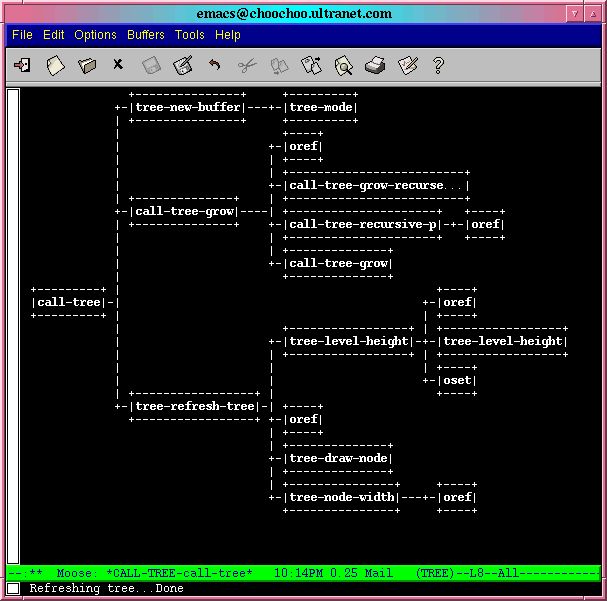
Sample EIEIO driven tree 
Sample EIEIO driven chart |
- linemark
- Maintain colored marks on lines in multiple buffers.
Visual C++ bookmark UI as example code.
Hilight Compilation hits as example code. - tree
- display trees in emacs buffers.
- call-tree
- display a call tree to an emacs lisp function
- chart
- display bar charts in emacs buffers. Includes several useful examples
Tools using EIEIO |
- Semantic
- Parser Generator. The Database which tracks tags between sessions uses EIEIO persistent data classes.
- EDE
- Emacs Development Environment uses EIEIO to track project information, and uses persistend data classes, instance inheritors, and instance trackers. It also uses speedbar classes to provide a project overview.
- SRecode
- Semantic Recoder template manager uses EIEIO to handle template tables.
- COGRE
- COnnected GRaph Editor uses EIEIO to track graph elements.
- JDE
- Java Development Environment for Emacs uses EIEIO to manage the debugger, dialogs, and more.
- ECB
- Emacs Code Browser. Browse your files and source code.
- XAE
- XML Authoring tool.
- jomtool
- Java code generator.
Read the doc |
Check it out here
Join the mailing list |
Join the mailing list to ask question, or help develop EIEIO.
Notes: |
EIEIO should work with Emacs 19.3x, 20.x, and 21.x. It should also work (and is usually included with) XEmacs 20.x, and 21.x.
Downloading CEDET |
All the CEDET tools are available from a single distribution file to ease installation.
Latest Stable Release: CEDET 1.1
Try out cedet-1.1.tar.gz.
CEDET 1.1 includes all the security fixes from 1.0.1, a long list of bug fixes, and additional new features to support Java, Android and Arduino programming!
Our goal for CEDET 1.1 is that this will be the LAST release using the current install and file organization schemes. This will also be the last release to support Emacs 22! Future released versions will use a new file system scheme compatible with Emacs 24.<
After building CEDET 1.1, consider joining the mailing list and help make CEDET better.
Previous Stable Release: CEDET 1.0.1
The previous stable release is cedet-1.0.1.tar.gz. You will need CEDET 1.0.1 for older versions of Emacs, such as Emacs 21 or 22.1.
About this Security Release:
CEDET 1.0 has a security issue related to loading project files with
EDE. If you are using CEDET 1.0, please upgrade to CEDET 1.0.1 to
recover from this issue. If you use Emacs 23.3 with built-in CEDET,
please upgrade to Emacs 23.4 or later, apply the
patch,
or upgraded to CEDET 1.0.1.
CEDET Development
Did you find a bug?
If you encounter problems with a CEDET release, those issues may have already been fixed in Git! CEDET has an active community of users that help identify and fix these issues quickly. You can check the mailing list archives or just try the Git version directly.
When using CEDET from Git, please note that we are transitioning to a new file and install scheme to be more compatible with Emacs 24. Changes will be required in your .emacs.
Emacs Version Support:
CEDET 1.0.1, and 1.1* has TWO automated build processes, one via Make, and the other via starting Emacs, and executing a build command.
This table shows the automated testing done for the release of CEDET 1.1:
| Emacs 22 | Emacs 23 | Emacs 24 | |
|---|---|---|---|
| UBuntu 11.10 | ✓ | ||
| Debian Stable | ✓ | ✓ | ✓ |
| OSX 10.6 | ✓ | ✓ | |
| Windows 7/cygwin | ✓ |
Emacs 21 CEDET's test suite will fail, but most parts still work for CEDET 1.0.1.
XEmacs Neither build process works with XEmacs 21.4. It is possible to build parts of it by hand it so it works however.
SXEmacs We have integrated patches to support SXEmacs, but we haven't tested it ourselves. Parts of CEDET have been reported to install and work.
Windows XP/7
If you do not have cygwin, you will need to use the cedet-build.el
script to build CEDET.
