|
 User Tools

Setting up CEDET |
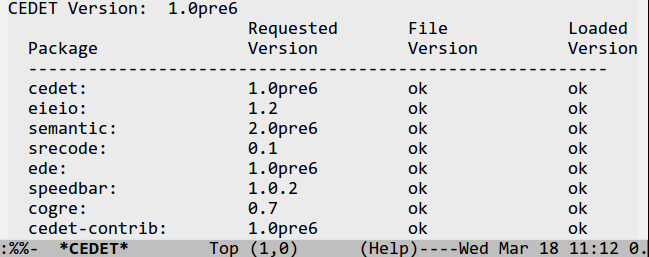
Setting up a tool as large and complex as CEDET can seem daunting. Fortunately, a minimal CEDET initialization can take up only a couple lines of code in your .emacs file. If you are brave and enjoy customizing your CEDET past this, then you are in luck as there are more options and small features to play with than anyone sane person might want.
Alex Ott has written a great article called A Gentle Introduction to CEDET that shows both the simple CEDET configuration process, and a wide array of customizations that helps tune your Emacs for programming the smart way.
The image to the right shows the CEDET internal package and
revision testing output. Making sure all the package revisions
needed are accurate is important, and fully automatic.
Basic Setup |
Step 1
Download CEDET from the Sourceforge downloads page. Choose the version from the side-bar on the left of this page.Step 2
Use your favorite tool to unpack CEDET into your favorite place to install new Emacs Lisp packages. The .tar.gz file will automatically create a directory called cedet-VERSION/ for all the sources, where VERSION is the version of the package you downloaded.Step 3
Build CEDET. On a unix based system such as Linux, you can do it using make.make EMACS=emacsIf you are on Windows, and or don't have make for some reason, you can use CEDET's built in project management system to force CEDET to bootstrap itself. You can initiate the build process like this:
  cd cedet-1.0pre6

  emacs -Q -l cedet-build.el -f cedet-build
For more on the build process, see the INSTALL file in the root of the CEDET distribution.
Step 4
Configure CEDET in your .emacs file by adding code like this:(load-file "~/cedet-1.0pre6/common/cedet.el") (global-ede-mode 1) ; Enable the Project management system (semantic-load-enable-code-helpers) ; Enable prototype help and smart completion (global-srecode-minor-mode 1) ; Enable template insertion menuFor more simple configuration options, see the INSTALL file in the root of the CEDET distribution.
Step 5
Still confused?
Alex Ott has written a great article
called
A Gentle Introduction to CEDET that shows both the
simple CEDET configuration process, and a wide array of
customizations that helps tune your Emacs for programming the smart
way.
Downloading CEDET |
All the CEDET tools are available from a single distribution file to ease installation.
Latest Stable Release: CEDET 1.1
Try out cedet-1.1.tar.gz.
CEDET 1.1 includes all the security fixes from 1.0.1, a long list of bug fixes, and additional new features to support Java, Android and Arduino programming!
Our goal for CEDET 1.1 is that this will be the LAST release using the current install and file organization schemes. This will also be the last release to support Emacs 22! Future released versions will use a new file system scheme compatible with Emacs 24.<
After building CEDET 1.1, consider joining the mailing list and help make CEDET better.
Previous Stable Release: CEDET 1.0.1
The previous stable release is cedet-1.0.1.tar.gz. You will need CEDET 1.0.1 for older versions of Emacs, such as Emacs 21 or 22.1.
About this Security Release:
CEDET 1.0 has a security issue related to loading project files with
EDE. If you are using CEDET 1.0, please upgrade to CEDET 1.0.1 to
recover from this issue. If you use Emacs 23.3 with built-in CEDET,
please upgrade to Emacs 23.4 or later, apply the
patch,
or upgraded to CEDET 1.0.1.
CEDET Development
Did you find a bug?
If you encounter problems with a CEDET release, those issues may have already been fixed in Git! CEDET has an active community of users that help identify and fix these issues quickly. You can check the mailing list archives or just try the Git version directly.
When using CEDET from Git, please note that we are transitioning to a new file and install scheme to be more compatible with Emacs 24. Changes will be required in your .emacs.
Emacs Version Support:
CEDET 1.0.1, and 1.1* has TWO automated build processes, one via Make, and the other via starting Emacs, and executing a build command.
This table shows the automated testing done for the release of CEDET 1.1:
| Emacs 22 | Emacs 23 | Emacs 24 | |
|---|---|---|---|
| UBuntu 11.10 | ✓ | ||
| Debian Stable | ✓ | ✓ | ✓ |
| OSX 10.6 | ✓ | ✓ | |
| Windows 7/cygwin | ✓ |
Emacs 21 CEDET's test suite will fail, but most parts still work for CEDET 1.0.1.
XEmacs Neither build process works with XEmacs 21.4. It is possible to build parts of it by hand it so it works however.
SXEmacs We have integrated patches to support SXEmacs, but we haven't tested it ourselves. Parts of CEDET have been reported to install and work.
Windows XP/7
If you do not have cygwin, you will need to use the cedet-build.el
script to build CEDET.
